-18%
Huajiang Tech
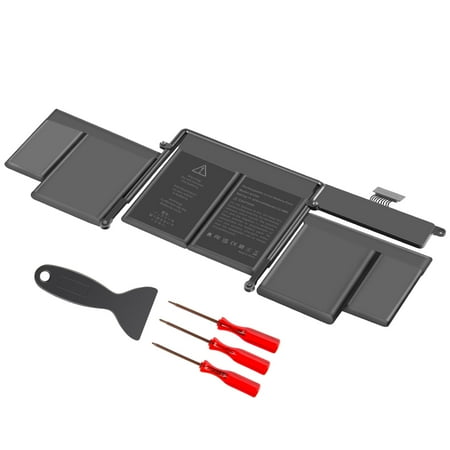
Battery For Mac/book Pro 13 A1502 MF839LL/A MF841LL/A MGX92LL/A MGX72LL/A ME864LL/A A1582
$39.99
$48.99
In Stock
Walmart
View Deal at Walmart
You'll be taken to the retailer's site to complete your purchase.
BrandHuajiang Tech
Size[]
ConditionNew
Specification: Battery type: Li-ion Voltage:11.42V Capacity: 74.9Wh Cells: 6cell Recharge cycles: 500 Operation time: Around 1.5-3hours Compatible with MacBook Pro Part Numbers: MJLU2LL/A MF839LL/A MF841LL/A MGX92LL/A MGX72LL/A BTO/CTO ME864LL/A MGX72LL/A ME867LL/A A1582 A1502 A1493 Battery Compatible With Macbook Pro Models As Follows : MacBookPro12 1 - MacBook Pro 13 inch A1502 Retina Early 2015 MacBookPro11 1 -- MacBook Pro 13 inch A1502 Retina Mid 2014 MacBookPro11 2 -- MacBook Pro 13 inch A1502 Retina Late 2013 HUAJIANG TECH LAPTOP BATTERY FOR YOUR PEACE OF MIND! How to Find Your Macbook Pro Model? 1.Find the serial number printed on the bottom of the Macbook next to the regulatory mark. It can also be found next to the barcode label on the original packaging. 2.Open your macbook pro and click the Apple menu in the upper left corner click About This Mac and you will see the model size and release year such as Macbook Pro 13 inch Mid 2012 3.The original packaging may show an Apple part number such as MNYF2xx/A ( xx is a variable which varies by country or region). You can find the entry that matches this Apple part number in the DESCRIPTIONS to find your model. 4.If you re still not able to find the right model of your macbook welcome to contact us via email at any time we are always here for you within 24 hours! HOW TO USE THE BATTERY CORRECTLY TO ENSURE LASTING LONGER BATTERY LIFE: 1.To prevent safety issues from transportation all battery out off factory are charged 40-50% (you can check from laptop Battery indicator icon). For initial using of the battery please discharge it to 5%(not to 0%) and then charge to 100% and cycle 3-4 times to activate the battery s maximum capacity. 2.In daily using please recharge immediately when battery reduced to 15% level. Or it will shorten the battery life and cause damages to the battery. 3.If the battery do not use for a long time better to charge the battery to a minimum 50% electricity. Otherwise it will cause unable to charge again. 4.To maintain the best battery state replacement battery needs to be fully discharge to 15% and recharge to 100% each 2 month. 5.Do not disassemble crush or puncture. Do not dispose the battery in fire or water. 6.Do not unplug the battery during charging better to turn off the Mackbook when recharge the battery. Don t connect adapter for a long time while using the battery. It may damage the battery. 7.If your laptop can t be charged or cannot be fully charged there may be possibilities that the adapter does not compatible with the laptop or there s some damage with the adapter. Please switch off your laptop and try again or change to a correct adapter.
| Brand | Huajiang Tech |
| Size | [] |
| Condition | New |
| Barcode / EAN | 6901489026021 |
| Store | Walmart |