MaximalPower
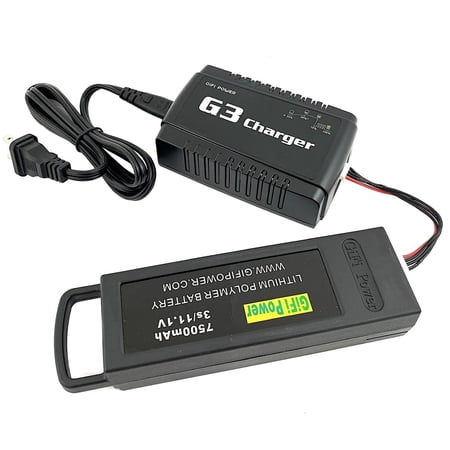
MaximalPower Balance Charger for Yuneec Q500 Parrot Disco LiPo Drone Battery | Different Pin Ports - 3-Pin 4-Pin 5-Pin - for Various Drone Batteries (Charger & 7500mA Battery for Yuneec Q500)...
$118.99
In Stock
Walmart
View Deal at Walmart
You'll be taken to the retailer's site to complete your purchase.
BrandMaximalPower
Color[Other]
Size[]
ConditionNew
Available Packs: - With 7500mA battery for Yuneec Q500 - With 4050mA battery for Parrot Disco FPV How to Charge and Check Status: 1. Connect the cable to the 4-pin port of the battery slot. 2 Connect the other end of the cable to the charger port. 3. Plug in the power cable into the charger slot and use the AC plug to plug into a power outlet. 4. The charger should turn on indicated by the nodes lightning up with a blue LED light. 5. Keep the charging status in check by observing when the charging status hit certain percentage tiers. Once it hits 100% the battery should be fully charged. 6. After charging the battery unplug the power cable and store the charger unit back into its box for safe storage. Charging Status Info: Top left side of the charger shows the charging status of the battery with a blue LED light and the percentage tiers: - 25% - Start of charge - 50% - 75% - 100% - Fully charged SPECIFICATIONS: Type: Drone Battery Charger Compatibility: Works with original manufacturer equipment for Yuneec Q500 Parrot Disco FPV and more Input: 100-240V 50/60Hz Output: 12.6V ~ 4A Package includes: 1x Charger 1x 4-Pin Cable Connector 1x Power Cable Item Dimensions: Charger: 4.5 x 3 x 1.5 Connector Cable: 4.95 (length) Power Cable Plug: 45 (approx) Box Dimensions: 5.5 x 4.95 x 1.65 Weight: 10.2 oz MPN: DRC YUN Q5001CHG SKU: 2036 NOTES: US-based Brand Warranty with Customer Service Support available. Please contact us if you have any questions or concerns! Accessories only. Battery not included unless buying the combo packs. GIFI Yuneec and Parrot brand mentions are for reference and demonstration purposes only. This product is an aftermarket item that s compatible with OEM/original equipment manufacturer parts. No copyright infringement intended.
| Brand | MaximalPower |
| Color | [Other] |
| Size | [] |
| Condition | New |
| Barcode / EAN | 880243525948 |
| Store | Walmart |